It’s Time To Reconsider My Thoughts on GPUs in VDI…

Last year, I wrote that it was too early to consider GPUs for general VDI use and that they  should be reserved only for VDI use cases where they are absolutely required.  There were a number of reasons for this including user density per GPU, lack of monitoring and vMotion, and economics.  That lead to a Frontline Chatter podcast discussing this topic in more depth with industry expert Thomas Poppelgaard.

When I wrote that post, I said that there would be a day when GPUs would make sense for all VDI deployments.  That day is coming soon.  There is a killer app that will greatly benefit all users (in certain cases) who have access to a GPU.

Last week, I got to spend some time out at NVIDIA’s Headquarters in Santa Clara taking part in NVIDIA GRID Days.  GRID Days was a two day event interacting with the senior management of NVIDIA’s GRID product line along with briefings on the current and future technology in GRID.

Disclosure: NVIDIA paid for my travel, lodging, and some of my meals while I was out in Santa Clara.  This has not influenced the content of this post.

The killer app that will drive GPU adoption in VDI environments is Blast Extreme.  Blast Extreme is the new protocol being introduced in VMware Horizon 7 that utilizes H.264 as the codec for the desktop experience.  The benefit of using H.264 over other codecs is that many devices include hardware for encoding and decoding H.264 streams.  This includes almost every video card made in the last decade.

So what does this have to do with VDI?

When a user is logged into a virtual desktop or is using a published application on an RDSH server, the desktop and applications that they’re interacting with are being rendered, captured, encoded, or converted into a stream of data, and then transported over the network to the client.  Normally, this encoding happens in software and uses CPU cycles.  (PCoIP has hardware offload in the form of APEX cards, but these only handle the encoding phase, rendering happens somewhere else…

When GPUs are available to virtual desktops or RDSH/XenApp servers, the rendering and encoding tasks can be pushed into the GPU where dedicated and optimized hardware can take over these tasks.  This reduces the amount of CPU overhead on each desktop, and it can lead to snappier user experience.  NVIDIA’s testing has also shown that Blast Extreme with GPU offload uses less bandwidth and has lower latency compared to PCoIP.

Note: These aren’t my numbers, and I haven’t had a chance to validate these finding in my lab.  When Horizon 7 is released, I plan to do similar testing of my own comparing PCoIP and Blast Extreme in both LAN and WAN environment.

If I use Blast Extreme, and I install GRID cards in my hosts, I gain two tangible user experience benefits.  Users now have access to a GPU, which many applications, especially Microsoft Office and most web browsers, tap into for processing and rendering.  And they gain the benefits of using that same GPU to encode the H.264 streams that Blast Extreme uses, potentially lowering the bandwidth and latency of their session.  This, overall, translates into significant improvements in their virtual desktop and published applications experience*.

Many of the limitations of vGPU still exist.  There is no vMotion support, and performance analytics are not fully exposed to the guest OS.  But density has improved significantly with the new M6 and M60 cards.  So while it may not be cost effective to retrofit GPUs into existing Horizon deployments, GPUs are now worth considering for new Horizon 7 deployments.

*Caveat: If users are on a high latency network connection, or if the connection has a lot of contention, you may have different results.

EUC5404 – Deliver High Performance Desktops with VMware Horizon and NVIDIA GRID vGPU

Notes from EUC5405.

Reasons for 3D Graphics

  • Distributed Workforces with Large Datasets – harder to share
  • Contractors/3rd Party workers that need revocable access – worried about data Leakage and Corporate Security

Engineering firm gained 70% productivity improvements for CATIA users by implementing VDI – slide only shows 20%

Windows 7 drives 3D graphics, Aero needs 3D.  Newer versions of Windows and new web browsers do even more.

History of 3D Graphics in Horizon

  • Soft3D was first
  • vSGA – shared a graphics card amongst VM, limited to productivity and lightweight use
  • vDGA – hardwire card to virtual machine
  • GRID vGPU – Mediated Pass-thru, covers the middle space between vSGA and vDGA

vGPU defined – Shared access to physical GPU on a GRID card, gets access to native NVIDIA drivers

vGPU has official support statements from application vendors

Product Announcement – 3D graphics on RDSH

vGPU does not support vMotion, but it does support HA and DRS placement

Upgrade Path to Horizon vGPU

If you already have GRID cards and are using vDGA or vSGA, there is an upgrade path to vGPU.

Steps:

  • Upgrade to vSphere 6.0
  • Upgrade Horizon to 6.1 or newer
  • Install NVIDIA VIBs on host
  • Upgrade VMs to version 11
  • Set vGPU profiles
  • Install drivers in VMs

vGPU has Composer Support

GRID Profiles set in vCenter

Two settings to configure – one in vCenter (vGPU Profiles) and one in Horizon

GRID 2.0 – bringing Maxwell to GRID

More users, Linux Support

Moving to Platform – software on top of hardware instead of dedicated product line for GRID

GRID 2.0 is hardware plus software.  Changing from being a driver into a platform and software with additional features

Licensing is changing. Licensed user groups.

Grid Editions

vMotion not coming today – much more complicated problem to solve

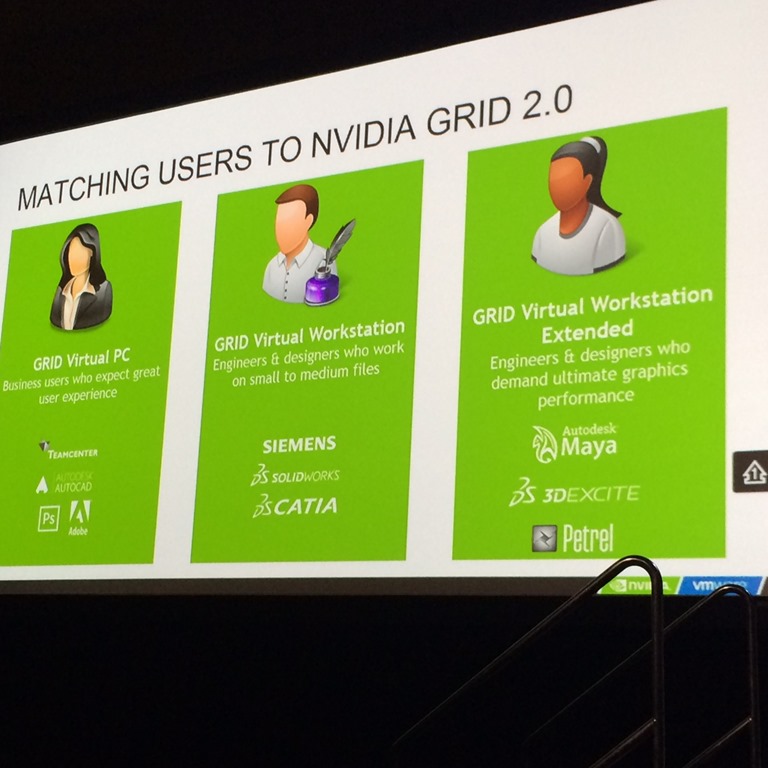
GRID editions

GRID Use Cases

Virtual PC – business users who expect great perf, AutoCAD, PhotoShop

Virtual Workstation – Siemens, Solidworks, CATIA, REVIT

Virtual Workstation Extended – Very high end.  Autodesk Maya


High-Perf VDI is not the same your regular VDI

  • Density goes down, CPU/Memory/IOPS/Rich Graphics capabilities go up
  • Workloads are different than traditional VDI

Hardware Recommendations

  • vSphere 6.0 Required
  • VM must be HW version 11
  • 2-8 vCPUs, at least 4 for Power Users
  • Minimum 4GB RAM
  • 64-bit OS

Required Components in VMs:

  • VM Tools
  • View Agent
  • NVIDIA Driver

Use the VMware OS Optimization Tool fling.  Users can see up to 40% in resource savings.

Sizing Rich Graphics – Storage

Storage still critical factor in performance

CAD users can demand more than 1TB of storage per desktop

Size and performance matter now

Storage Options:

  • Virtual SAN – SSD based local storage
  • Or All-Flash based SANs

Bringing Rich 3D into Production

  • Establish End-User Acceptance Criteria to verify that User Experience is acceptable
  • Have end users test applications and daily tasks
  • Time how long it takes to complete tasks

The Next Generation of Virtual Graphics–NVIDIA GRID 2.0

When vGPU was released for Horizon View 6.1 back in March 2015, it was an exciting addition to the product line.  It addressed many of problems that plagued 3D Graphics Acceleration and 3D workloads in virtual desktop environments running on the VMware platform.

vGPU, running on NVIDIA GRID cards, bridged the gap between vDGA, which is dedicating a GPU to a specific virtual machine, and vSGA, which is sharing the graphics card between multiple virtual machines through the use of a driver installed in the hypervisor.  The physical cores of the GRID card’s GPU could be shared between desktops, but there was no hypervisor-based driver between the virtual desktop and the GPU.  The hypervisor-based component merely acted as a GPU scheduler to ensure that each virtual desktop received the resources that it was guaranteed.

While vGPU improved performance and application compatibility for virtual desktops and applications, there were certain limitations.  Chief amongst these limitations was support for blade servers and virtual machines running Linux.  There were also hard capacity limits – GRID cards could only support so many virtual desktops had vGPU enabled.

Introducing GRID 2.0

Today, NVIDIA is announcing the next generation of virtual Graphics Acceleration – GRID 2.0.

GRID 2.0 offers a number of benefits over the previous generation of GRID cards and vGPU software.  The benefits include:

  • Higher Densities – A GRID card with 2 high-end GPUs can now support up to 32 users.
  • Blade Server Support – GRID 2.0 will support blade servers, bringing virtual desktop graphics acceleration to high-density compute environments.
  • Linux Desktop Support – GRID 2.0 will support vGPU on Linux desktops.  This will bring vGPU to a number of use cases such as oil and gas.

GRID 2.0 will also offer better performance over previous generations of GRID and vGPU.

Unfortunately, these new features and improvements aren’t supported on today’s GRID K1 and K2 cards, so that means…

New Maxwell-based GRID Cards

NVIDIA is announcing two new graphics cards alongside GRID 2.0.  These cards, which are built on the Maxwell architecture, are the M60 – a double-height PCI-Express card with two high-end Maxwell cores, and the M6 – a GPU with a single high-end Maxwell core that is designed to fit in blades and other rack-dense infrastructure.  The M6 is designed to have approximately half of the performance of the M60.  Both cards double the amount of memory available to the GPU.  The M6 and M60 each have 8GB of RAM per GPU compared to the 4GB per GPU on the GRID K1 and K2.

Both the M6 and the M60 will be branded under NVIDIA’s TESLA line of data center graphics products, and the GRID 2.0 software will bring the graphics virtualization capabilities on top of these new Maxwell-based Tesla cards..  The M60 is slated to be the direct replacement for both the GRID K1 and GRID K2 cards.  The K1 and K2 cards will not be discontinued, though – they will still be sold and supported for the foreseeable future.