A Day of Giving Thanks

Today, the United States celebrates Thanksgiving.  It’s a day that we come together with our families to eat a little turkey, watch some football, and give thanks for the good things in our lives. 

I have a lot to be thankful for this year.  Some of the things I’m thankful for are:

1. An amazing and supportive family.

2. An awesome and challenging job with some of the smartest people I know.

3. A great community that enables passionate IT professionals to come together and share with each other.  Although I might only see people at VMUGs and conferences, I’ve come to consider many people friends.

4.  A Bears victory over the Packers…at Lambeau.

I hope everyone has a great Thanksgiving.

Countdown to Virtualization Field Day 5–#VFD5

In two weeks, I get the pleasure of joining some awesome members of the virtualization community in Boston for Virtualization Field Day 5. 

If you’re not familiar with Virtualization Field Day, it is one of the many Tech Field Day events put on by Stephen Foskett (@sfoskett) and the crew at Gestalt IT.  These events bring together vendors and members from the community to have technical discussions about the vendor’s products and offerings.   These events are streamed live on the Tech Field Day website, and there are many opportunities to interact with the delegates via Twitter by following the #VFD5 hashtag.

The vendors that will be sponsoring and presenting at Virtualization Field Day 5 are:

DataGravity_392x652-wpcf_100x17

 logo1

     logo-large-gray-wpcf_100x48
logo-wpcf_100x21        med-vert-notag-wpcf_93x60 PernixData_Logo_Color
Scale_Logo_High_Res-wpcf_100x38 v2Ravello_Logo_large-wpcf_100x27 VMTurboLogoSm

I will be joining an awesome group of delegates:

This will be my first time attending Virtualization Field Day as a delegate.  I’ve previously watched the events online and interacted with the delegates on Twitter. 

Keep watching this space, and the #VFD5 hashtag on Twitter, as there will be a lot more exciting stuff.

Writing for Virtualization Review – My 2nd Gig

In my end of the year wrap-up post, I teased that there would be an announcement coming early in January.   Now that it’s early January, I can let the cat out of the bag.

Starting this month, I will writing a twice-per-month column called Sean’s Virtual Desktop in Virtualization Review.  My plan is to write about VDI and to do how-to type articles like the Horizon View series that I’ve done on this blog.

My first article, Pets and Cattle in Virtual End User Computing, should be up sometime in the next day or two.

Edit: The article is now up, and it can be viewed here.

Looking Back at 2014, My Goals for 2015, and Something New….

Christmas is here, and the end of 2014 is just around the corner.  That means it is time to look back on this year and start looking forward to the next.  I also have a couple of announcements at the end of the post.

A Year in Review

2014 was a very busy year with a lot of exciting opportunities to grow.  Some of the highlights from this year were:

  • Giving my first vBrownbag Presentation
  • Participating in the Virtual Design Master challenge
  • Attended my second VMworld, where I presented on the vBrownbag stage and met a lot of really cool people
  • Passed both VCAP exams in the desktop track
  • Was a technical reviewer on the VMware Horizon View 6 Desktop Virtualization Cookbook by Jason Ventresco
  • Became a VMware vExpert and Cisco Champion
  • Joined the Steering Committee for the Wisconsin VMUG

The biggest highlights were early in the year when my wife and I welcomed our second child, a daughter, into the world and moved into our new house.

Blog Statistics

2014 was a very busy year on the blog front.  As of 12/24/2014, I had posted 86 times and received 149,600 page views for the year.  Those numbers should creep up to closer to 90 posts and 150,000 page views by the end of the year.

Some key statistics for the year are:

2015 Goals

I have a few goals for 2015.  These goals are:

  1. Get My VCDX: I will be starting my design documentation for my VCDX after the 1st of the year.  I have my design picked out, and my goal is to defend in October.
  2. Make the jump to a vendor or partner: This kind of goes with goal #1 as this will help with the VCDX process.  I currently work on the customer side, and I would like to transition to the other side and work for a vendor or a partner.  My long-term goal is to get into technical marketing or become a technology evangelist.
  3. Find a better balance between work, community involvement, and family: I think this one is self-explanatory.  Smile

And now for the good stuff

I mentioned that I had a couple of announcements at the top of the post.  None of the announcements are a new job, otherwise I would not have listed that as one of my goals for the next year.  But I do think they are exciting opportunities.

The first announcement is that I’ve been invited to present at the inaugural meeting of the North Central Wisconsin VMUG in early February at UW-Eau Claire.  I’ll have more details about the date and time as they become available.

The second announcement is going to be a bit vague at this point.  It’s not a new job, in a manner of speaking, but it is a big opportunity that I’m very excited about.  Keep an eye out in early January for more details.

And a big thank you…

This year wouldn’t have been as successful as it was without the great vCommunity.  A few of the people that I’d like to thank are:

  • The Wisconsin VMUG Leadership team
  • The Virtual DesignMaster leadership team of Eric Wright, Angelo Luciani, and Melissa Palmer and all of the judges and participants
  • Jonathan Frappier and the vBrownBag crew
  • Josh Atwell – who, despite being in most of the above, has provided some great advice

I’m looking forward to 2015, and I hope everyone has a great year.

My VCDX Journey – One Year In

Last year, I set a rather challenging goal for myself – to become a VCDX within three years.  I’m now one year in, and I wanted to update my progress.

When I first set the goal, I had only just achieved VCP status with the VCP5-DCV and the VCP5-DT and I was looking at the daunting challenge of the VCAP exams.

Today, I’m much closer to achieving a VCDX.  I’ve completed the prerequisite exams for the VCDX-DT.

But I’m not ready to take the next step of the journey yet.  Although I gained a lot of valuable experience from Virtual Design Master, I don’t have enough real-world experience to put together a #VCDX quality design.

I’m not sure how I am going to rectify this yet, but I have the next year to figure it out and start working on a formal design.

Community Matters – A VMworld 2014 Retrospective

This year’s VMworld was the second that I had the pleasure of attending.  Last year had been my first, and while I had a good time, I didn’t really know anyone or even know what I wanted to get out of it, and I wasn’t the type to just walk up to someone I talked to on Twitter and introduce myself or engage in table talk.

And most nights, after the sessions were done, I would grab dinner alone and go back to my hotel.

What a difference a year makes.

Last year’s conference opened the door and showed how wide and vibrant the greater virtualization community is.  It encouraged me to get more active in my local VMUG, on twitter and through community events such as Virtual Design Master.

I put myself out there, and I grew as both an IT Professional and a person, and along the way, I made new connections and new friends, and my experience at VMworld this year was different because of it.

The moral of the story is to get involved with your local user communities.  Build relationships with others in your profession through groups like VMUG or AITP.  And if one doesn’t exist (or worse, inactive) build it up so others can get the same benefits.

The Changing Face of EUC

The first section of Tuesday’s keynote was devoted to VMware’s End-User Computing division, and they shared their vision for the future of the market.

And let me tell you – it’s game changing.

{Note: I do not have early access to any of the EUC technologies discussed below.  Everything discussed below is from the keynote.]

VMware demonstrated the expanded capabilities in Horizon 6 and the improvements that they’ve made to the Blast protocol.  It’s now possible to deliver 3D applications, such as Autodesk 3D Max and the Adobe Creative Suite, to users without having to install a client on your machine.  Yes, it’s all accessible from an HTML5-enabled web browser.

They demoed CloudVolumes. CloudVolumes is an application layering technology that can overlay desktop applications onto a desktop in real time with no need to recompose linked clone desktops or use complex deployment tools like SCCM.  And it’s easy enough that you can delegate this task to the Help Desk.

And they also talked about the Horizon Suite.  In previous versions of Horizon, the products were stand-alone with limited integration.  VMware has started changing this and more closely integrating the Horizon Suite products in the same way that they’ve been been integrating products into the vCloud Suite.

My employer works in the construction industry, and we have projects across the country.  These jobs often require heavy 3D graphics to support the Autodesk REVIT MEP suite for building information management, and that means deploying workstations that can run MEP effectively to these locations.

The features of the Horizon Suite would change this.  Engineers and Project Managers would be able to access a desktop with AutoCAD from  Safari on an iPad or Chromebook from any jobsite anywhere in the country and provide feedback to engineers in the office.  Engineers would be able to go onsite and work with CAD without having to lug around a 30 pound workstation laptop.

But that wasn’t the most disruptive announcement.  One of the new features that was announced was Project Fargo.  Project Fargo will utilize features in vSphere 6 (currently in beta) to rapidly deploy “disposable” virtual machines up to 30x faster than deploying linked clones.  It almost sounds like the next version of vSphere will be able to use a process similar to forking a process in Linux to build up and tear down desktops.

When you combine Project Fargo with Persona Management (or Liquidware Labs ProfileUnity) and CloudVolumes, you get fully-configured Just-In-Time desktops.

I hope that we’ll hear more about these features over the next couple of months.

#vBrownbag TechTalk at VMworld

The great folks who run #vBrownbag are hosting another series of Tech Talks at this year’s VMworld.  These short talks are given in the Hang Space and feature community members presenting on topics that they’re passionate about and cover a variety of topics including Log Insight, Docker, and OpenStack. 

I’ll be giving a Tech Talk on automating the Microsoft stack using vCenter Orchestrator and PowerShell on Monday at 4:30.

The entire schedule is available here.

If you haven’t double (or tripled) booked yourself yet, and you’re passionate about a topic, there are still some slots available. 

Horizon View 6.0 Part 7–Installing View Composer

The last couple of posts have dealt with preparing the environment to install Horizon View 6.0.  We’ve covered prerequisites, design considerations, preparing Active Directory, and even setting up the service accounts that will be used for accessing services and databases.

Now its time to actually install and configure the Horizon View components.  These tasks will be completed in the following order:

  • Install Horizon View Composer
  • Install Horizon View Connection Server
  • Configure the Environment for the first time
  • Install the Security Server

One note that I want to point out is that the installation process for most components has not changed significantly from previous versions.

Before we can install Composer, we need to create an ODBC Data Source to connect to the Composer database.  The database and the account for accessing the database were created in Part 6.  Composer can be installed once the ODBC data source has been created.

Composer can either be installed on your vCenter Server or on a separate Windows Server.  The first option is only available if you are using the Windows version of vCenter.  This walkthrough assumes that Composer is being installed on a separate server.


Service Account

Part 6 covers the steps for creating the Composer service account.  This account should have local administrator rights on the server prior to installing Composer.

Creating the ODBC Data Source

Unfortunately, the Composer installer does not create the ODBC Data Source driver as part of the Composer installation, and this is something that will need to be created by hand before Composer can be successfully installed.  The View Composer database doesn’t require any special settings in the ODBC setup, so this step is pretty easy.

Note: The ODBC DSN setup can be launched from within the installer, but I prefer to create the data source before starting the installer.  The steps for creating the data source are the same whether you launch the ODBC setup from the start menu or in the installer.

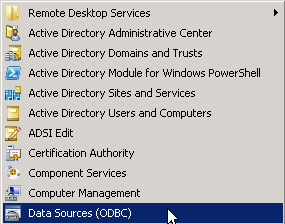
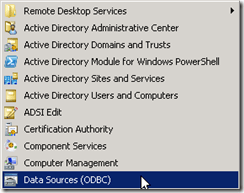
1. Go to Start –> Administrative Tools –> Data Sources (ODBC)
2014-01-04_22-25-06

2. Click on the System DSN tab.

3. Click Add.

2014-01-04_22-25-44

4. Select SQL Server Native Client 10.0 and click Finish.  This will launch the wizard that will guide you through setting up the data source.

2014-01-04_22-26-27

Note:  SQL Server 2012 uses Native Client 11.0. If the Composer database is installed on SQL Server 2012, Native Client 11.0 should be used.

Note: The SQL Server Native Client is not installed by default. If you are connecting to a database on another server, you will need to download and install the native client for SQL Server 2008 R2 from Microsoft (direct download link). 

5. When the Create a New Data Source wizard launches, you will need to enter a name for the data source, a description, and the name of the SQL Server that the database resides on.  If you have multiple instances on your SQL Server, it should be entered as ServerName\InstanceName.  Click next to continue.

2014-01-06_22-50-48

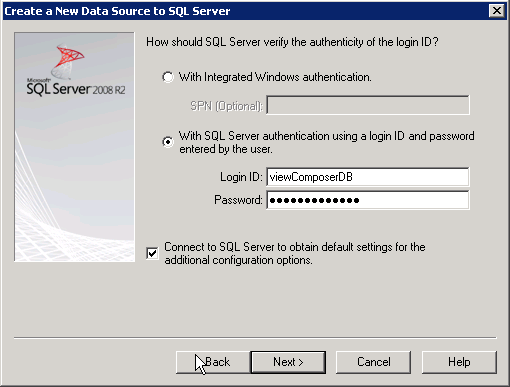
6. Select SQL Server Authentication.  Enter your SQL Server username and password that you created above.  Optional: Check the Connect to SQL Server to obtain default settings box to retrieve the default settings from the server.  Click Next to continue.

2014-01-04_22-28-15

7. Change the default database to the viewComposer database that you created above.  Click Next to continue.

2014-01-04_22-28-55

8. Click Test Data Source to verify that your settings are correct.

2014-01-04_22-29-19

9. If your database settings are correct, you will see the windows below.  If you do not see the TESTS COMPLETED SUCCESSFULLY, verify that you have entered the correct username and password and that your login has the appropriate permissions on the database object.  Click OK to return to the previous window.

2014-01-04_22-29-37

10. Click OK to close the Data Source Administrator and return to the desktop.
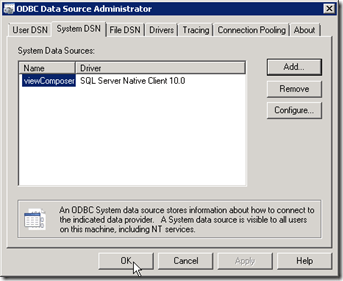
2014-01-04_22-29-55

Installing View Composer

Once the database connection has been set up, Composer can be installed.  The steps for installing Composer are:

1.  Launch the View Composer installer.

2.  If .Net Framework 3.5 SP1 is not installed, you will be prompted to install the feature before continuing.

1

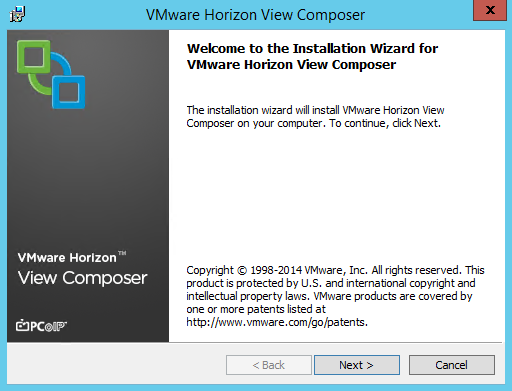
3.  Click Next to continue.

2

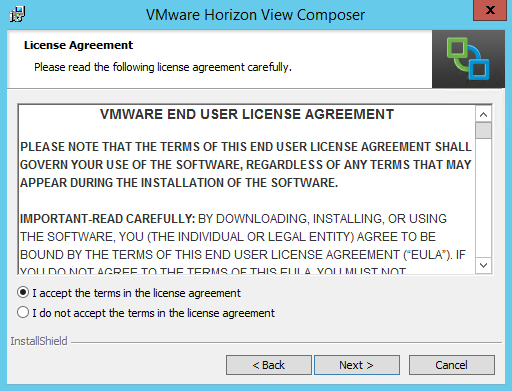
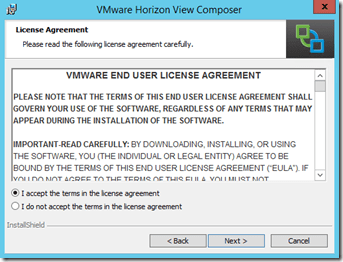
4.  Accept the license agreement and click next.
3

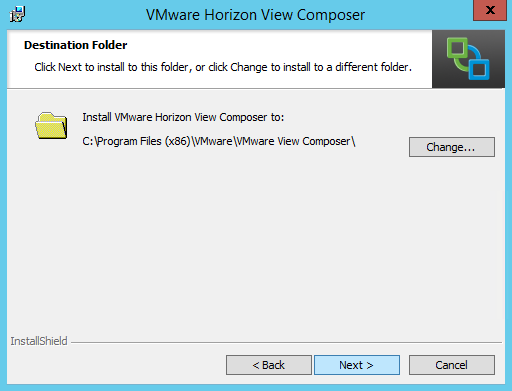
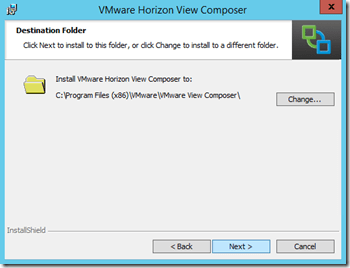
5.  Select the destination folder where Composer will be installed.
4

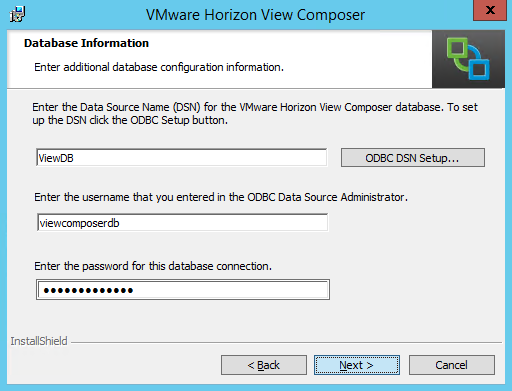
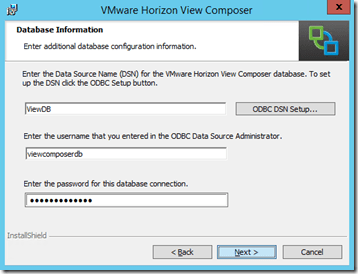
6. Configure View to use the ODBC data source that you set up.  You will need to enter the data source name, SQL login, and password before continuing.
7

7. After the data source has been configured, you will need to select the port that Composer will use for communicating with the View Connection Servers.  You also have the option of selecting an existing certificate if you have installed one.
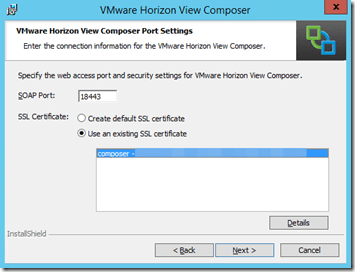
8

8. Click Install to start the installation.
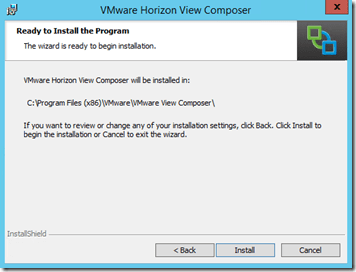
9

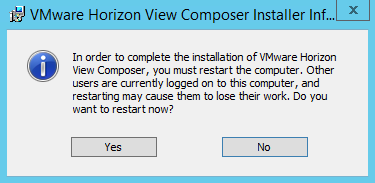
9. Once the installation is finished, you will be prompted to restart your computer.

10

So now that Composer is installed, what can we do with it?  Not much at the moment.  A connection server is required to configure and use Composer for linked clone desktops, and the next post in this series will cover how to install that Connection Server.

Sexism, Bro Culture, and IT – Thoughts on A Recent Advertising Campaign

On June 4th, 1919, the United States Senate passed what would go on to become the 19th Amendment to the US Constitution, which granted sufferage to women, by a vote of 56 yeas to 25 nays.  It would take more than a year to officially become part of the Constitution.

History, it seems, is not without a sense of irony.  Yesterday, Nutanix launched a new ad campaign called nixVblock.  This campaign, which should have highlighted the advantages of their product over the VCE converged infrastructure, instead veered into “Bro Culture” territory with “high brow humor” that is normally reserved for locker rooms, fraternity houses, and lite beer commercials.

The primary characters of the nixVblock ads are an IT guy named Doug and his “date” Vicky Block, who goes by VBlock for short.  While Doug is characterized as your average IT infrastructure engineer, “VBlock” is supposed to be an uninteresting, high maintenance woman who hears three voices in her head and dresses like three separate people.

The “VBlock” character is supposed to represent the negatives of the competing VCE vBlock product.  Instead, it comes off as the negative stereotype of a crazy ex that has been cranked past 11 into offensive territory.

When I saw the videos, I was offended.  These videos were laden with unfortunate implications (warning: TV Tropes link), and they hit a lot of my berserk buttons (warning: another TV Tropes link).  I found them to be both sexist and insulting to those suffering from mental illness.  These negatives completely overshadowed any positives that I might have picked up about their product.

But most of all, I’m disappointed.  Nutanix has great technology and some of the smartest people in tech working for them.  They didn’t need to stoop to this level, and this ad campaign showed a complete lack of awareness for current events.

In the last couple of weeks, we’ve had the following:

You’d think that someone, somewhere in the company, would have seen these and thought “Maybe this is a bad idea.  Maybe we should scrap these videos.”

Obviously, that did not happen.

It’s 2014.  Why do we need to continue to perpetuate sexism in IT?

Note: Nutanix appears to have pulled the videos from the nixvblock website prior to this post.