Lab Update -Migrating to Nutanix CE and Lessons Learned

vSphere has been a core component of my home lab for at least 15 years.  I’ve run all sorts of workloads on it ranging from Microsoft Exchange in the earliest days of my lab to full-stack VDI environments to building my own cloud for self-hosting Minecraft Servers and replacing paid SaaS apps with open source alternatives.

So last year, I made a hard decision to migrate my home lab off of VMware products and onto other platforms.  There were multiple factors that drove this decision.  Some of these decision points were:

  • A desire to simplify my lab infrastructure
  • Removing licensing dependencies like community/influencer program membership for my lab’s core infrastructure
  • Support EUC solutions like Dizzion Frame that were not available on my platform
  • Didn’t want to rebuild everything from scratch

I realized early on that this would need to be a lab migration.  I had too many things in my lab that were “production-ish” in the sense that my family would miss them if they went away. There were also budget, hardware, and space constraints, so I wouldn’t be able to run the two full stacks to run services in parallel during this process even if I had wanted to rebuild services.

I also wanted to use the migration to rationalize aspects of the lab.  Some parts of my lab had been operating for over a decade and had built up a lot of kruft. This would be a good opportunity to retire those parts of the lab and rebuild those instances if those services were needed.

Approach to Migration and Defining Requirements

Since my lab had taken on a “production-ish” quality, I wanted to approach the migration like I would have approached a customer or partner’s project. I evaluated my environment; documented my requirements, constraints, risks, and future state architectures; and developed an implementation and migration plan.  

Some of the key requirements and constraints that I identified for my main workload cluster were:

  • Open-Source or community licensing not constrained by NFRs or program membership
  • Live migration support
  • Utilize hyperconverged storage to simplify lab dependencies
  • Hypervisor-level backup integration, particularly Veeam as I was using Community Edition in my lab
  • Hashicorp Packer support
  • Migration tool or path for vSphere workloads
  • I was out of 10 GbE ports, so I could only add 1 new server at a time after retiring older hardware

The leading candidates for this project were narrowed down to Nutanix Community Edition, Proxmox, and XCP-NG. I selected Nutanix Community Edition because it checked the most boxes.  It was the easiest to deploy, it had Nutanix Move for migrating from vSphere, and when I started this project in 2024, it was the only option that fit my licensing requirements that Veeam supported.

You’ll notice that EUC vendor support is not on the list.  While trying out other EUC tools in my lab was a driver for changing my lab, I didn’t want to make that a limiting factor for my main workload cluster.  This cluster would also be running my self-hosted applications, Minecraft servers, and other server workloads. Licensing and backup software support were bigger factors. I could always stand up a single node of a hypervisor to test out solutions if I needed to, although this became a moot point when I selected Nutanix.

I identified two major outcomes that I wanted to achieve. The first, as noted in the requirements, was to remove licensing dependencies for my lab. I didn’t want to be forced into having to migrate to a new platform in the future because of NFR licensing or community program changes. The lab needed to stand on it’s own.

The second outcome was to reduce my lab’s complexity. My lab had evolved to be a small-scale mirror of the partners I used to cover, and that lead to a lot of inherent complexity. Since I was no longer covering cloud provider partners, I could remove some of this complexity to make lab and workload management easier.

I ended up buying one new host for my lab.  At the time I started this, my lab was a mix of Dell PowerEdge R430s, R620s, and R630s for virtual workloads. I wanted to run Nutanix on the newest hardware that I had available. Nutanix CE does not support 2-node clusters, and I wanted to have matching hardware configs for that cluster to simplify management.  

Workload Migration

After deploying Nutanix CE, Prism Central, and Nutanix Move, I started planning my workload migration.

Migrating my workloads proved to be the easiest part of this process.Nutanix Move just worked for migrating workloads. I had a few minor challenges with my test workloads that I was able to address these with some preplanning.

What challenges did I encounter?  The biggest challenges were with my Debian servers, and they came in two forms.  The first was that the main network interface was renamed from ens192 to ens3 when changing hypervisors, and I worked around this by renaming the interface in the networking config before shutting down the servers and migrating off of vSphere.

The second challenge was due to how I deployed my Debian VMs. I built my Debian templates as OVA files, and I used OVF properties to configure my servers at deployment. There were scripts that ran on boot that would read the OVF properties and configure the default user, network stack, and some application information like Minecraft server properties.  These servers needed to be disabled or removed prior to migration because they would error out if there were no OVF properties to read. Nutanix does not support OVF properties, and those attributes would be stripped from the VM during the migration.

Once I worked around these issues, I was able to accelerate the migration timeline and move all of my server workloads in a few days.  

Impact on Workflows and Processes

Major infrastructure changes will impact your workflows and processes.  And my lab migration was no exception to this. 

The largest impact was how I built and deployed VMs. I use Packer to build my Debian and Windows templates. I reused most of my Packer builds, but I had to make a few small adjustments to jobs for them to function with Nutanix. There were also some functionality differences that were resolved wtih two pull requests to add missing functionality for Debian and Windows OS builds.

My Debian build and deploy process changed in two ways.  First, I had to change how I consumed Debian.  On vSphere, I would build each image from scratch using the latest Debian ISO and a custom installer file that was pulled down from a local webserver. The Nutanix Packer could not send keystrokes to the VM, so I was unable to load my custom installer configuration file.  

I switched to using the prebuilt Debian Generic images, but this change had two further impacts.  First, these images assumed that the VM had a serial port for console debugging.  The Nutanix Packer plugin did not support adding a serial port to a VM, so I submitted a pull request to add this feature.  The second impact was that I needed to learn Cloud-Init to inject a local user account and network configuration to build the VM.  This was a good change since I also needed cloud-init to configure any VMs I deployed from these Debian templates.

I faced two small, but easily fixed, challenges with my Windows build process. The first challenge is that the Nutanix Packer Plugin did not support changing the boot order when the VM used UEFI. The Nutanix API supported this. However, the Packer plugin had never been updated which resulted in my second pull request. The other challenge I’ve encountered is that Nutanix does not support virtual floppy disk drives for the Windows Installer configuration files and initial configuration scripts, and this is easily solved by having Packer create an ISO for these files using xorriso or a similar tool.

I also ran into an issue with Veeam that delayed my implementation, but that had more to do with the network design choices I made for my self-hosted applications than anything specific to Veeam or AHV. That issue had to do with a legacy network design that I carried over from VMware Cloud Director that I should have ditched when I removed VCD from my lab but kept around because I was being lazy. 

In an enterprise environment, these minor issues would have been found and addressed during an evaluation or very early in the migration process.  But since I am running my lab as a single person, these issues were discovered after the migration and took longer to resolve than expected because I was juggling multiple tasks.

Lessons Learned

A hypervisor or cloud migration is a large project, and there were some key lessons that I learned from it. For my workloads and environment, the workload migration was the easy part. VMs are designed to be portable, and tools exist to make this process easy. 

The hard part was everything around and supporting my workload.  Automation, backup, monitoring…those pieces are impacted the most by platform changes. The APIs are different, and the capabilities of your tooling may change due to API changes. I’ve spent more time rebuilding automation that I had built over years than actually moving my workloads.

Those changes are also an opportunity to introduce new tools or capabilities.  A migration may expose gaps that were papered over by manual processes or quick-fix scripts, and you can use this opportunity to replace them with more robust solutions. As I talked about above, I had been using OVF Properties for configuring Linux VMs instead of good configuration management practices.  This change not only forced me to use Cloud-Init, but I’ve started to introduce Ansible for configuratoin management.

Here is what I would recommend to organizations that are considering a platform change or migration.

  1. Do your homework up front to make sure you understand your workloads, business and technical requirements, and your business IT ecosystem
  2. Get a partner involved if you don’t have a dedicated architecture team or the manpower to manage a migration while putting out fires. They can facilitate workshops, get vendors involved to answer questions, and act as a force multiplier for your IT team.  
  3. Evaluate multiple options.  One size does not fit all organizations or use cases, and you may find the need to run multiple platforms for business or technical reasons
  4. Test and update any integrations and automation before you start migrating workloads. Putting the work in up front will ensure that you can mark the project complete as soon as that last workload is migrated over.

In my case, I didn’t do #4.  I was under a crunch due to space and budget limitations and using NFR licenses in my lab, and I wanted to move my workloads before those licenses expired. 

If you have questions about hypervisor migrations or want to share your story, please use the contact me link.  I would love to hear from you.
Omnissa Horizon on Nutanix AHV

Tech conferences always bring announcements about new products, partnerships, and capabilities. This year’s Nutanix .Next conference is no exception, and it is starting off with a huge announcement about Omnissa Horizon.

Omnissa Horizon is adding support for Nutanix AHV, providing customers building on-premises virtual desktops and applications environments with the choice of hypervisor for their end-user computing workloads.

Horizon customers will also have the opportunity to participate in the Beta of this new feature. Signup for the beta is available on the Omnissa Beta site.

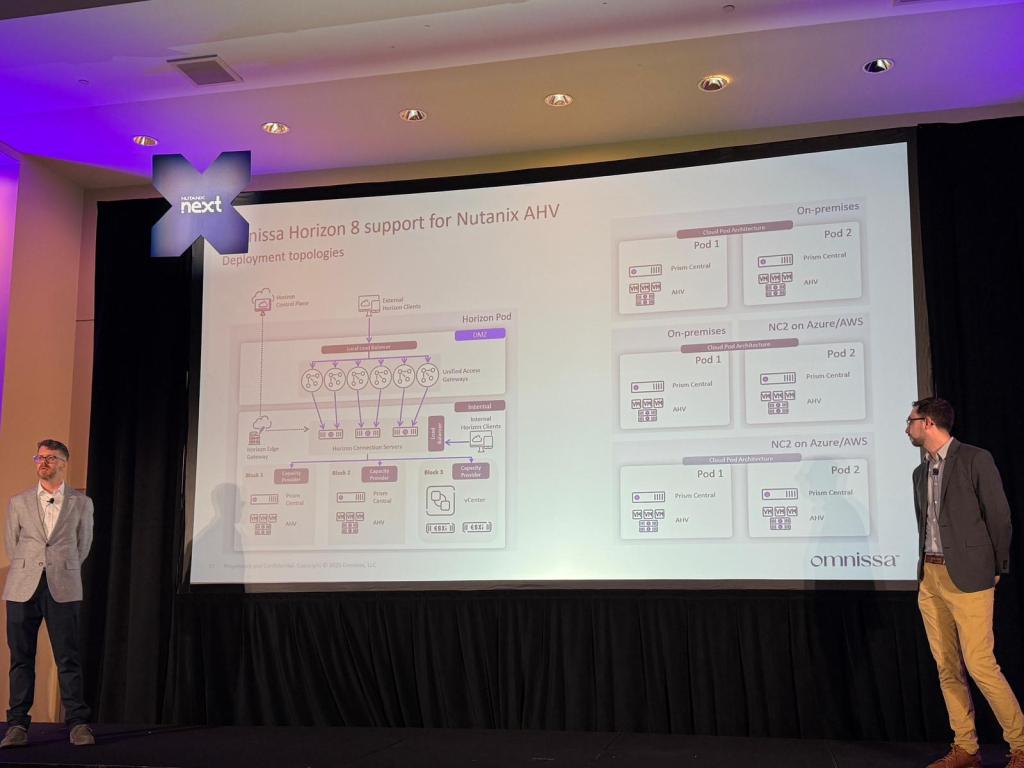
I’m not at the .Next conference this week, but I have heard from attendees that the Horizon on AHV session was well attended and included a lot of technical details including a reference architecture showing Horizon running on both Nutanix AHV and VMware vSphere in on-premises and cloud scenarios. The session also covered desktop provisioning, and Horizon on Nutanix will include a desktop provisioning model similar to “Mode B Instant Clones” using Nutanix’s cloning technologies.

Horizon on AHV reference architecture. Picture courtesy of Dane Young

My Thoughts

So what do I think about Horizon on Nutanix AHV? I’m excited for this announcement. Now that Omnissa is an independent company, they have the opportunity to diversify the platforms that Horizon supports. This is great for Horizon customers who are looking at on-premises alternatives to VMware vSphere and VCF in the aftermath of the Broadcom acquisition.

I have a lot of technical questions about Horizon on Nutanix, and I wasn’t at .Next to ask them. That’s why I’m signing up for the beta and planning to run this in my lab.

I’ve seen some great features added to both Horizon and Workspace ONE since they were spun out into their own company. These include support for Horizon 8 on VMware Cloud Director and Google Cloud and the Windows Server Management feature for Workspace ONE that is currently in beta.

If you want to learn more about Horizon on Nutanix AHV, I would check out the blog post that was released this morning. If you run Nutanix in production or use Nutanix CE in your home lab, you can register for the beta.

Home Lab Projects 2025

Happy New Year, everyone!

Back in February 2024, I posted about some of the cool and fun open-source projects I was working with in my home lab.  All of these projects were supporting my journey into self-hosting, and I was building services on top of them. As we ring in 2025, I wanted to talk about some of the fun home lab projects I worked on in the back half of last year.

Aside from the Grafana Stack (which I did not finish implementing because I was focusing on other things…), I’ve had a lot of success with self-hosting open source projects, and I wanted to talk about some of the other projects I’ve been working with this year.

Nutanix Community Edition

I want to start by talking about infrastructure and the platform that I am running my lab on.  Last spring, I was testing Dizzion Frame in my lab.  Frame, which was previously owned by Nutanix, is a cloud-first EUC solution that can also run in an on-premises Nutanix AHV environment.  So I spun up a 1-node Nutanix Community Edition cluster just for Frame.  

I really liked it.  It was easy to use and had a very intuitive interface.  It is a great platform for running EUC workloads. 

So after fighting with removing NSX-T and VCD from my home lab over the summer, I decided that it was time to move my lab to another platform. I had been using vSphere in my lab for at least a decade…and it felt like a good time to try something new.

It was also a good time to make a choice because after deciding to move some of my lab to another platform, changes to the vExpert and VMUG Advantage licenses were announced.  I had no desire to jump through those hoops.

Migrating off of vSphere is a relevant topic right now, so I wanted to approach this like any customer organization would because I didn’t want to start completely from scratch.  I went through a requirements planning exercise, evaluated alternatives including Oracle Enterprise Virtualization, Proxmox, and XCP-NG, and wrote a future state architecture.

I selected Nutanix for my new lab platform for the following reasons:

  • Enterprise-grade solution that uses the same code base as the licensed Nutanix products and integrates with Veeam
  • Has a tool to migrate from vSphere
  • Integrates with multiple EUC products
  • Allow me to streamline my lab by reducing my host count and removing the need for external storage for VMs…

Migrating from vSphere to Nutanix was painless.  Nutanix Move made the process very simple, even without using the full power of that product.  

Like any platform, it’s not perfect.  There are a few things I need to work around with Veeam and VMs that sit behind network address translation that are at the bottom of my list.  I also need to move away from using Linux virtual appliances that are configured through OVF properties and adopt a more infrastructure-as-code approach to deploying new virtual machines and services.  This isn’t a bad thing…it just takes time to get up to speed on Ansible and Terraform. 

Maybe I’ll achieve my dream of letting my kids deploy their own Minecraft Servers.

Learning these quirks has been a fun challenge, and I don’t think I’ve had this much fun diving into an infrastructure product in a long time. 

You’re probably wondering what hardware I’m using for my CE environment.  I have three Dell PowerEdge R630s with dual Intel E5-2630 v3 CPUs, 256 GB of RAM and a PERC HBA 330.  This is an all-flash setup with a mix of NVME, SATA, and SAS drives.  Each host has the same number, type of drives, and capacity but the SATA drive models vary a bit.

The biggest challenge that I’ve run into is managing disks in Nutanix CE.  While CE runs on the same codebase as other Nutanix products, it does do some things differently so it can run on pretty much anything that meets the minimum requirements.  CE does not pass through the local storage controller, so there are different processes for adding or replacing disks or using consumer-grade disks. 

The mix of SATA SSDs gave me a few challenges when getting the environment set up.  I think I need to write a post on this in 2025 because Nutanix CE 2.1 changed things and the community documentation hasn’t quite caught up.

Joplin

Joplin is an open-source multi-platform notetaking app named for composer and pianist Scott Joplin.  It’s basically an open-source version of Obsidian or Microsoft OneNote.  Like Obsidian, Joplin stores files locally as markdown files.  But, unlike Obsidian or OneNote, it has built-in sync capabilities that does not require a 3rd-party cloud service, subscription, or plugin.

Joplin supports a few options for syncing between devices including using Dropbox, OneDrive, S3, and their own self-hosted sync server.  

I use Joplin as my main notetaking application.  I’m self-hosting a Joplin sync server and using that to sync all of my notes across almost all of my devices. Joplin supports Windows, MacOS, IOS, Android, and Linux.  

One feature that Joplin is missing is a web viewer for notes.  There is a sidecar container called Joplin-webview that can address this issue, but I haven’t tried it yet.  

One feature of the Joplin Sync Server that I like is user management.  The Joplin Sync Server has a built-in user management feature that allows an administrator to set quotas and control how user notebooks are shared. Joplin Sync Server does not support OIDC, so it can’t be integrated into any SSO solution today.

I can provide a Google or OneNote alternative to my kids while maintaining privacy, control of my data, and not being tied to a cloud service.

Peppermint

There may be some benefits to running a service desk platform in your home lab.  If your family and friends use services hosted out of your home lab (or if you provide other support to them), it can be a great way to keep track of the issues they’re experiencing or the requests they’ve made.  

There are some free-tier or freemium cloud service desk solutions, and there are some self-hosted open source help desk systems like Znuny (a fork of OTRS) and RT.  In my experience, these options usually aren’t ideal for a home lab.  The freemium solutions are too limited to encourage businesses to buy a higher tier, and the open source solutions are too complex.  

Last year, I stumbled across an open-source Zendesk or Jira Service Desk alternative called Peppermint.  Peppermint is a lightweight, web-based service desk solution that supports email-based ticketing and OIDC for SSO.  

It’s basically a 1-person project, and the developer is active on the project’s discord server. 

I was planning to use Peppermint for supporting my kid’s Minecraft servers.  I wanted to have them open a ticket whenever they had an issue with their servers or wanted to request something new.  

While that is great preparation for the workforce, it’s terrible parenting.  So I dropped that plan for now, and I’m looking at other ways to use Peppermint like having my monitoring systems create tickets for new issues instead of emailing me when there are problems.

Liquidware CommandCTRL

I wanted to end this post with something that really deserves a much longer blog post –  Liquidware CommandCTRL.  

CommandCTRL is a SaaS-based Digital Employee Experience (or DeX for short) and remediation solution.  I first learned about it at VMworld 2023, and I’ve been using it on several devices in my house.

It should not be confused with Stratusphere UX – Liquidware’s other monitoring and assessment tool.  Like Stratusphere, CommandCTRL provides agent-based real-time monitoring of Windows and MacOS endpoints.

There are three things that set CommandCTRL apart from Stratusphere UX.  First, as I’ve already mentioned, CommandCTRL is a SaaS-based tool. You do not need to deploy a virtual appliance in your environment to collect data.  

Second, CommandCTRL does not provide the detailed sizing and assessment reports that Stratusphere provides.  It provides some of the same detailed insights, but it is geared more towards IT support instead of assessment.

Finally, CommandCTRL has a really cool DVR-like function that lets me replay the state of a machine at a given time.  This is great when users (or in my home environment, my kids…) report a performance issue after-the-fact.  You can pull up their machine and replay the telemetry to see what the issue was.

There are a couple of CommandCTRL features that I haven’t tried yet.  It has some RMM-type features like remote control and remote shell to troubleshoot and manage devices remotely without having to bring them into the office. 

If you install the CommandCTRL agent on your physical endpoint and a virtual desktop or published app server, you can overlay the local, remote, and session protocol metrics to get a full picture of the user’s experience. 

Liquidware provides a free community edition of CommandCTRL to monitor up to five endpoints, which is perfect for home use or providing remote support for family members.

Wrap Up

These are just a few of the tools I’ve been using in my lab, and I recommend checking them out if you’re looking for new things to try out or if one of these projects will help solve a challenge you’re having.

Apply TODAY! To Be An Omnissa Tech Insider

Are you passionate about End-User Computing technologies?  Do you like sharing your experience with the community through writing, podcasting, creating video content, organizing the community, or presenting at events?

Do you like learning about the latest technologies in the EUC space?  And do you want to help shape future products and product roadmaps?

If you answered yes to any of these questions, then I’ve got something for you.

Applications are now open for the 2025 Omnissa Tech Insiders program.

What is the Omnissa Tech Insiders Program?

Earlier this year, Omnissa launched the Tech Insiders program. Omnissa Tech Insiders is the continuation of the long-running EUC vExpert program that recognized community members who contributed back by sharing their passion and knowledge for the EUC products and a unique spin 

Membership in the program is more than just a badge that you put on your LinkedIn profile.  Tech Insiders get to peek behind the curtain and interact with Omnissa’s business and technical leaders.  This includes the opportunity to help shape Omnissa’s future product direction by providing feedback on new product features and invitations into beta and early access programs and being tapped as a subject matter expert for Omnissa blogs and webinars.

There is swag too.  Who can forget about swag?

And I hear that there is more cool stuff coming to the program in 2025.

Apply to Become a Tech Insider Today!

You can learn more about the Omnissa Tech Insiders program on the Omnissa Community forums.  Holly Lehman has a great blog post explaining what Omnissa Tech Insiders is.  And while you’re there, sign up to join the Omnissa Community.

Tech Insider applications will be open until January 5th, 2025, and members of the Class of 2025 will be announced on February 3rd.  You can learn more about the application process here, and you can apply to join the program using this link.

Why You Should Attend the First EUC World Conference…

If you’re in the EUC space, you have probably heard about EUC World: Independence. 

A couple of weeks ago, the World of EUC announced their first conference that will be taking place on October 22nd and 23rd in Silver Springs, Maryland.  

So after hearing that name, you’re probably wondering a few things.  Why is “Independence” called out so strongly in the name? And probably most importantly, why should I attend? 

The Independent EUC Conference

Independence is a big part of what EUC World will be.  But why does independence matter?  And why have we made it a big part of the conference name?

The EUC World: Independence Mission Statement is:

To empower the EUC community through open collaboration and knowledge sharing, fostering innovation and driving industry standards that prioritize user experience and technological inclusivity.

Most IT conferences are organized by a vendor or software company.  They set the agenda, messaging, and tone of the event.  Everything revolves around that vendor because its their event.

EUC World: Independence is fundamentally different in two ways:

Platform-agnostic discussion: We welcome diverse perspectives and technologies, ensuring no single vendor dictates the conversation.

Community-driven content: Attendees shape the agenda through contributions, workshops, and presentations, reflecting the collective knowledge and needs of the EUC landscape.

Collective influence: By uniting experts and IT professionals, we aim to guide the EUC industry towards a future that prioritizes user-centric solutions and equitable access to technology.

EUC World is an event organized by the EUC Community for the EUC Community.  It is a conference featuring community in everything it does, including:

  • Keynotes by notable community members Brian Madden, Shawn Bass, and Gabe Knuth
  • Technical sessions by Dane Young, Shane Kleinert, Sven Huisman, Esther Bartel, and Chris Hildrebrandt
  • An “EUC Unplugged” style unconference event on the afternoon of the 2nd day of the conference. This is an event where attendees will submit and vote on the Day 2 agenda on the first day of the conference.

As you can see, the community is at the heart of EUC World.

That doesn’t mean we won’t have sponsors.  EUC World’s four premier sponsors are Liquidware, Nerdio, NVIDIA, and Omnissa, and the other announced conference sponsors at the time of this post are 10ZiG, Apporto, Goliath Technologies, Sonet.io, and Stratodesk.

How to Attend EUC World: Independence

This probably sounds like a great event to attend if you work with EUC products or are in the EUC community.  

You can see the full conference schedule, list of speakers, and register at https://worldofeuc.org/eucworld2024

If you register by August 31st, 2024, you will receive the early bird rate of $150 for the event.  The price goes up to $200 on September 1st.  After registering, you will also receive an event code to book your hotel room at the Doubletree by Hilton Washington DC using our discounted rate of $169 per night. 

I’m Finally Building My AI Lab…

When I wrote a Home Lab update post back in January 2020, I talked about AI being one of the technologies that I wanted to focus on in my home lab.  

At that time, AI had unlimited possibilities but was hard to work with. Frameworks like PyTorch and Tensorflow existed, but they required a Python programming background and possibly an advanced mathematics or computer science degree to actually do something with them.  Easy-to-deploy self-hosted options like Stable Diffusion and Ollama were still a couple of years away.

Then the rest of 2020 happened.  Since I’m an EUC person by trade, my attention was diverted away from anything that wasn’t supporting work-from-home initiatives and recovering from the burnout that followed.

GPU accelerated computing and AI were starting to come back on my radar in 2022.  We had a few cloud provider partners asking about building GPU-as-a-Service with VMware Cloud Director.  

Those conversations exploded when OpenAI released their technical marvel, technology demonstrator, and extremely expensive and sophisticated toy – ChatGPT.  That kickstarted the “AI ALL THE THINGS” hype cycle.

Toy might be too strong of a word there.  An incredible amount of R&D went into building ChatGPT.  OpenAI’s GPT models are an incredible technical achievement, and it showcases the everyday power and potential of artificial intelligence.  But it was a research preview that people were meant to use and play with. So my feelings about this only extend to the free and public ChatGPT service itself, not the GPT language models, large language models in general, or AI as a whole.

After testing out ChatGPT a bit, I pulled back from AI technology.  Part of this was driven by trying to find use cases for experimenting with AI, and part of it was driven by an anti-hype backlash.  But that anti-hype backlash, and my other thoughts on AI, is a story for another blog.

Finding my Use Case

Whenever I do something in my lab, I try to anchor it in a use case.  I want to use the technology to solve a problem or challenge that I have.  And when it came to AI, I really struggled with finding a use case.

At least…at first.

But last year, Hasbro decided that they would burn down their community in an attempt to squeeze more money out of their customers.  I found myself with a growing collection of Pathfinder 2nd Edition and 3rd-party Dungeons and Dragons 5th Edition PDFs as I started to play the game with my son and some family friends. And I had a large PDF backlog of other gaming books from the old West End Games Star Wars D6 RPG and Battletech.

This started me down an AI rabbithole.  At first, I just wanted to create some character art to go along with my character sheet.  

Then I started to design my own fantasy and sci-fi settings, and I wanted to create some concept art for the setting I was building.  I had a bit of a vision, and I wanted to see it brought to life.

I tried Midjourney first, and after a month and using most of my credits, I decided to look at self-hosting options.  That led me to Stable Diffusion, which I tested out on my Mac and my Windows desktop.

I had a realization while trying to manage space on my Macbook.  Stable Diffusion is resource heavy and can use a lot of storage when you start experimenting with models. The user interfaces are basically web applications built on the Gradio framework. And I had slightly better GPUs sitting in one of my lab hosts.

So why not virtualize it to take advantage of my lab resources? And if I’m going to virtualize these AI projects, why not try out a few more things like using an LLM to talk to my game book PDFs.

My Virtual AI Lab and Workloads

When I decided to build an AI lab, I wanted to start with resources I already had available. 

Back in 2015, I convinced my wife to let me buy a brand new PowerEdge R730 and a used NVIDIA GRID K1 card. I had to buy a brand new server because I wanted to test out the brand new (at the time) GPU virtualization in my lab VDI environment, and the stock servers were not configured to support GPUs. GPUs typically need 1100 watt power supplies and an enablement kit to deliver power to the GPU that aren’t part of the standard server BOM. Most GPUs that you’d find in a data center are also passively cooled, so the server needs high CFM-fans and hi-speed fan settings to increase airflow over them.

That R730 has a pair of Intel E5-2620 v3 CPUs, 192GB of RAM, and uses ESXi for the hypervisor.  Back in 2018, I upgraded the GRID K1 card to a pair of NVIDIA Tesla P4 GPUs.  The Tesla P4 is basically a data center version of a GTX 1080 – it has the same GP104 graphics processor and 8GB of video memory (also referred to as framebuffer) as the GTX 1080.  The main differences are that it is passively cooled and it only draws 75 watts, so it can draw all of its power from the PCIe slot without any additional power cabling.  

My first virtualized AI workload was the Forge WebUI for Stable Diffusion.  I deployed this on a Debian 12 VM and used PCI passthrough to present one of the P4 cards to the VM.  Image generation times were about 2-3 minutes per image, which is fine for a lab.  

I started to run into issues pretty quickly.  As I said before, P4 only has 8GB of framebuffer, and I would start to hit out-of-memory errors when generating larger images, upscaling images, or attempting to use LORAs or other fine-tuned models. 

When I was researching LLMs, it seemed like the P4 would not be a good fit for even the smallest models. It didn’t have enough framebuffer, poor fp16 performance, and no support for flash attention.  So the P4 gives an all-around bad experience.

So I decided that I need to do a couple of upgrades.  First, I ordered a brand new NVIDIA L4 datacenter GPU.  The L4 is an Ada Lovelace generation datacenter GPU.  It’s a single-slot, 24GB of framebuffer GPU that only draws 75 watts.  It’s the most modern evolution of the P4 form factor.  

But the L4 took a while to ship, and I was getting impatient.  So I went onto eBay and found a great deal on a pre-owned NVIDIA Tesla T4. The T4 is a Turing generation datacenter GPU, and it is the successor to the P4. It has 16GB of framebuffer, and most importantly, it has significantly improved performance and support for features like flash attention.  And it also only draws 75 watts.  

The T4 and L4 were significant improvements over the P4.  I didn’t do any formal benchmarking, but image generation times went from 2-3 minutes to less than a minute and a half.  And I was able to start building out an LLM lab using Ollama and Open-WebUI.  

What’s Next

The initial version of this lab used PCI Passthrough to present the GPUs to my VMs.  I’m now in the process of moving to NVIDIA AI Enterprise (NVAIE) to take advantage of vGPU features.  NVIDIA has provided me with NFR licensing through the NGCA program, so thank you to NVIDIA for enabling this in my lab.  

NVAIE will allow me to create virtual GPUs using only a slice of the physical resources as some of my VMs don’t need a full GPU, and it will allow me to test out some different setups with services running on different VMs.  

I’m also in the process of building out and exploring my LLM environment.  The first iteration of this is being built using Ollama and Open-WebUI.  Open-WebUI seems like an easy on-ramp to testing out Retrieval Augmented Generation (RAG), and I’m trying to wrap my head around that.

I’m building my use case around Pathfinder 2nd Edition.  I’m using Pathfinder because it is probably the most complete ruleset that I have in PDF form.  Paizo, the Pathfinder publisher, also provides a website where all the game’s core rules are available for free (under a fairly permissive license), so I have a source I can scrape to supplement my PDFs. 

This has been kind of a fun challenge as I learn how to convert PDFs into text, chunk them, and import them into a RAG.  I also want to look at other RAG tools and possibly try to build a knowledge graph around this content.

This has turned into fun, but also frustrating at times, project.  I’ve learned a lot, and I’m going to keep digging into it.

Side Notes and Disclosures 

Before I went down the AI Art road, I did try to hire a few artists I knew or who had been referred to me.  They either didn’t do that kind of art or they didn’t get back to me…so I just started creating art for personal use only. I know how controversial AI Art is in creative spaces, so if I ever develop and publish these settings commercially, I would hire artists and the AI art would serve as concept art.

In full disclosure, one of the Tesla P4s was provided by NVIDIA as part of the NGCA program.  I purchased the other P4.

NVIDIA has provided NFR versions of their vGPU and NVAIE license skus through the NGCA program. My vSphere licensing is provided through the VMware by Broadcom vExpert program.  Thank you to NVIDIA and Broadcom for providing licensing.

Introducing Omnissa – The Future Home of Horizon and Workspace ONE Launches Today!

Back in December 2023, Hock Tan announced that he would be looking to divest the entity that is the “soon-to-be-formerly-known-as the VMware EUC Business Unit.” Speculation ran rampant about possible buyers until the end of February when KKR announced that they had agreed to buy the EUC business for $3.8 billion USD and that it would become a standalone business.

That also led to a new round of speculation. What would the new entity be called? When would they stand on their own? How would Broadcom’s “Day 2” impact EUC during the divestiture process?

The future of “the business unit formerly known as VMware EUC” is now starting to come into focus as we get answers to these questions. While the divestiture is still in process and the expected closing date is unknown, we now formally know the new company’s name – Omnissa.

The Omnissa name (which is pronounced ahm-NISS-uh) was formally announced in a blog post by End-User Computing Vice President of Product and Technical Marketing Renu Upadhyay on April 25th, 2024. The blog post also includes the Omnissa vision statement and some background on how the name was selected.

Today (Monday, May 6th 2024), the Omnissa website and other selected sites have started to go live. While the acquisition has not closed, Broadcom has started the process of migrating the legacy VMware systems into Broadcom’s systems, and the EUC systems will be migrated into standalone systems to help support the future independent organization. Broadcom has posted a KB for this here: https://knowledge.broadcom.com/external/article?legacyId=97841

The following sites are live as of the time of this post, although not all features and functionality might be working.

In addition to the above links, redirects from the VMware website are being put in place for Horizon and Workspace ONE focused pages so that old URLs will continue to work.

So what do I think of the new branding? The first time I heard the name, I wondered who the Warhammer 40K fan was on the marketing team as Omnissa sounds a lot like the name of something from that game universe.

The more I think about the name and the branding that was announce today, the more I like it. It feels all-encompassing…like it pulls together all of the former VMware EUC products. And I am a big fan of the Omnissa Mission Statement. It is very customer and end-user focused, and I think it directly ties back to the product portfolio and the capabilities they can deliver.

So congratulations to the Omnissa team on the first step of your new brand launch. I’m looking forward to seeing more as you take the next steps on your independent journey.

(Note: I am not a Warhammer 40K fan…but as a general science-fiction and speculative fiction fan, I am familiar with some of that series lore. The only Warhammer I like comes from a completely different science fiction universe.)

Getting Back to Blogging

As you’ve probably noticed, I’ve been pretty quite lately. I haven’t actually posted anything in about two years. So I decided to write a quick update, especially since I’m not as active on social media as I used to be.

Yes, I am still alive. I’m not on Twitter anymore. I’ve moved to Mastodon, and if you’re looking for a Mastodon instance, I would highly recommend vmst.io.

COVID was hard. Burnout kind of kicked in during the pandemic, and it hit home shortly after I decided to start a YouTube channel. I had a few things in the production pipeline before I went on vacation, and then I decided to take a longer break. I even took a bit of a break from creating content for VMUG.

I played a lot of Pokemon instead.

But I’m trying to get back into the swing of things. Recently, I helped my team launch a Multi-Cloud page on the VMware Cloud Techzone site. And that has me back in the content creating mood.

I will be posting stuff again soon. I have some thing in the pipeline that I’ve been kicking around for a while. I’ll be putting out a home lab update, and I owe everyone a post about the Minecraft appliance OVA template that I built for my kids. And some other stuff around identity management in a multi-cloud world.

So hit that subscribe button and ring the bell to be notified when new content is posted.

Wait…that only works for YouTube.

Horizon REST API Library for .Net

So…there is a surprise second post for today. This one is a short one, and if you’ve been interested in automating your Horizon deployment, you will like this.

One of the new features of Horizon 2006 is an expand REST API. The expanded REST API provides administrators with the ability to easily automate pool management and entitlement tasks. You can learn more about the REST API by reviewing the Getting Started guide on Techzone, and you can browse the entire API on VMware Code.

Adopting this API to develop applications for Horizon has gotten easier. Andrew Morgan from the VMware End User Computing business unit has developed a .Net library around the Horizon Server REST API and released it on Github. This library supports both .Net 4.7 and .Net Core. The Github repo includes code samples for using the library with C# and Visual Basic.

I’m excited to see investment in this REST API as it will help customers, partners, and the community build applications to enhance and extend their Horizon deployments.

More Than VDI…Let’s Make 2019 The Year of End-User Computing

It seems like the popular joke question at the beginning of every year is “Is this finally the year of VDI?”  The answer, of course, is always no.

Last week, Johan Van Amersfoort wrote a blog post about the virtues of VDI technology with the goal of making 2019 the “Year of VDI.”  Johan made a number of really good points about how the technology has matured to be able to deliver to almost every use case.

And today, Brian Madden published a response.  In his response, Brian stated that while VDI is a mature technology that works well, it is just a small subset of the broader EUC space.

I think both Brian and Johan make good points. VDI is a great set of technologies that have matured significantly since I started working with it back in 2011.  But it is just a small subset of what the EUC space has grown to encompass.

And since the EUC space has grown, I think it’s time to put the “Year of VDI” meme to bed and, in it’s place start talking about 2019 as the “Year of End-User Computing.”

When I say that we should make 2019 the “Year of End-User Computing,” I’m not referring to some tipping point where EUC solutions become nearly ubiquitous. EUC projects, especially in large organizations, require a large time investment for discovery, planning, and testing, so you can’t just buy one and call it a day.

I’m talking about elevating the conversation around end-user computing so that as we go into the next decade, businesses can truly embrace the power and flexibility that smartphones, tablets, and other mobile devices offer.

Since the new year is only a few weeks away, and the 2019 project budgets are most likely allocated, conversations you have around any new end-user computing initiatives will likely be for 2020 and beyond.

So how can you get started with these conversations?

If you’re in IT management or managing end-user machines, you should start taking stock of your management technologies and remote access capabilities.  Then talk to your users.  Yes…talk to the users.  Find out what works well, what doesn’t, and what capabilities they’d like to have.  Talk to the data center teams and application owners to find out what is moving to the cloud or a SaaS offering.  And make sure you have a line of communication open with your security team because they have a vested interest in protecting the company and its data.

If you’re a consultant or service provider organization, you should be asking your customers about their end-user computing plans and talking to the end-user computing managers. It’s especially important to have these conversations when your customers talk about moving applications out to the cloud because moving the applications will impact the users, and as a trusted advisor, you want to make sure they get it right the first time.  And if they already have a solution, make sure the capabilities of that solution match the direction they want to go.

End-Users are the “last mile of IT.” They’re at the edges of the network, consuming the reosurces in the data center. At the same time, life has a tendency to pull people away from the office, and we now have the technology to bridge the work-life gap.  As applications are moved from the on-premises data center to the cloud or SaaS platforms, a solid end-user computing strategy is critical to delivering business critical services while providing those users with a consistently good experience.